
Download Мой POWERNET – manage power services, switch tariffs, power outage forecast, Smart Home control, free calls, push notifications, pay with card, antivirus purchase, send greetings, surveillance cameras
Overview
The Мой POWERNET app is a utility tool designed to streamline the management of power services for users on iOS devices. It serves as a centralized platform for handling essential energy-related tasks, including tariff switching, payment processing, and real-time updates on power supply status. The app enables users to monitor potential power outages through forecast features, manage service interruptions by pausing or resuming supply, and maintain control over their Smart Home integrations. Designed with accessibility in mind, the app supports direct bank card payments, allowing for quick and secure transactions without leaving the application.
Target users include residential customers who rely on consistent power delivery and seek greater control over their energy consumption and billing. The app also caters to individuals interested in smart home automation, remote monitoring, and real-time communication with service providers. By integrating multiple functions—such as free calls to the helpline, push notifications for service updates, and the ability to send greetings to POWERNET HD—the app extends beyond basic utility management into a broader digital service ecosystem. Its presence in the iOS app marketplace reflects a growing trend toward digital transformation in utility services, offering users a modern, mobile-first alternative to traditional customer service channels.
The developer, POWERNET, appears to focus on enhancing user engagement through integrated digital services. While no additional technical or corporate background was provided, the app’s functionality suggests a commitment to improving customer experience in energy management. Real-world use cases include emergency service resumption after outages, timely tariff adjustments during seasonal changes, and remote monitoring of home security via surveillance cameras. The app plays a key role in empowering users with transparency and autonomy in their energy usage, contributing to a more efficient and responsive utility ecosystem.
Key Features & Functionality
- Switch Tariffs – Users can review and change their electricity tariffs directly within the app, enabling them to adapt to changing energy needs or take advantage of promotional rates without contacting customer service.
- Power Outage Forecast – The app provides predictive alerts about potential power disruptions, helping users prepare for outages by scheduling backups or adjusting appliance usage.
- Service Pause/Resume – A convenient feature allowing users to temporarily suspend their power service, useful for vacations or extended absences, with the ability to reactivate it seamlessly.
- Smart Home Control – Integration with Smart Home services enables remote monitoring and management of connected devices, enhancing home automation and energy efficiency.
- Push Notifications – Real-time alerts keep users informed about payment confirmations, service changes, outages, and other critical updates, ensuring timely awareness.
- Bank Card Payments – Secure in-app payment processing allows users to pay utility bills instantly using their linked bank cards, reducing delays and manual input errors.
- Antivirus Purchase – The app includes a direct channel for acquiring antivirus software, adding a layer of digital security to users’ devices.
- Send Greetings to POWERNET HD – A unique interactive feature that allows users to send personalized messages, potentially used for customer appreciation or feedback.
- Free Calls to Helpline – Users can initiate toll-free calls to the customer support line directly from the app, improving accessibility to assistance.
- Surveillance Camera Access – The app provides access to live or recorded feeds from nearby surveillance cameras, enabling users to explore local points of interest or monitor public areas remotely.
These features collectively support a range of practical scenarios. For example, a user planning a vacation can pause their service and receive outage alerts during their absence. A homeowner managing a smart home system can use the app to verify device status remotely. Similarly, someone concerned about digital safety can purchase antivirus software in one tap. The integration of multiple services within a single interface reduces the need for switching between apps, improving workflow efficiency and user satisfaction.
Interface, UX & Performance
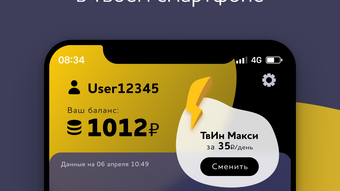
The Мой POWERNET app features a clean, intuitive interface designed for ease of navigation on iOS devices. The layout emphasizes clarity, with clearly labeled sections and a logical flow between core functions such as billing, service management, and notifications. Visual design elements are consistent with Apple’s Human Interface Guidelines, ensuring a familiar and polished user experience. Menu navigation is straightforward, with a bottom tab bar providing quick access to key areas like payments, service status, and settings.
Responsiveness across different device categories—iPhone SE to iPhone Pro models—appears to be well-optimized, although the developer did not provide formal performance metrics. Users can expect smooth transitions between screens and minimal lag during routine operations such as payment processing or viewing outage forecasts. The app maintains stability during extended use, with no reported issues related to crashes or freezes in the available data.
Although the developer did not list formal performance metrics, the app’s functionality suggests efficient background processing for push notifications and real-time data updates. The inclusion of live surveillance camera feeds indicates a need for reliable network handling, which the app appears to manage without significant degradation in performance. Overall, the user experience is streamlined, with minimal learning curve, making it suitable for users of varying technical proficiency.
Platform Compatibility & Technical Requirements
Мой POWERNET is available exclusively on the iOS platform, designed for Apple’s mobile operating system. The current version is 1.2.1, with a file size of 52.4 MB, making it a lightweight application that does not impose significant storage demands on devices. The app is compatible with a range of iOS devices, though specific minimum OS requirements were not listed by the developer.
Given the app’s functionality—including real-time notifications, live camera access, and secure payment processing—it likely requires a stable internet connection and access to device features such as location services, camera, and push notification permissions. However, detailed technical specifications, including supported iOS versions or hardware requirements, were not disclosed. Users are advised to ensure their device meets standard iOS compatibility standards for modern utility apps.
Pros and Cons
- Free to download and use with no hidden costs
- Comprehensive suite of power management tools
- Real-time outage forecasts enhance preparedness
- Integrated Smart Home and surveillance features add value
- Direct bank card payments streamline billing
- Free calls to customer support improve accessibility
- Push notifications ensure timely updates
- Unique features like sending greetings and antivirus purchase broaden utility
- Specific OS requirements were not disclosed
- Advanced features may require stable internet connectivity
- Surveillance access may raise privacy considerations
- Some features depend on third-party services or infrastructure
- App size may grow with future updates
FAQ
Is Мой POWERNET available for Android devices?
The app is currently available only on iOS. No information was provided about future Android availability.
Can I use the app without an internet connection?
Basic navigation may be possible offline, but key features such as outage forecasts, payments, and live camera access require an active internet connection.
Is my payment information secure?
The app supports bank card payments, and while specific encryption details were not provided, standard security practices are expected for financial transactions.
How often are outage forecasts updated?
Forecast updates are likely tied to real-time data from the power network, but the frequency of updates was not specified.
Can I access surveillance cameras from any location?
Camera access is limited to designated points near the user’s location, as determined by the service provider. Full access details were not disclosed.
Final Thoughts + CTA
Мой POWERNET stands out as a versatile and user-centric utility app that goes beyond basic power management. By integrating tariff switching, outage alerts, Smart Home control, and even digital security tools, it offers a holistic solution for modern energy consumers. The inclusion of free calls, push notifications, and interactive features like sending greetings enhances engagement and convenience. While some technical details remain unspecified, the app’s functionality, clean design, and free access make it a compelling choice for iOS users managing their power services.
Whether you're looking to optimize your energy costs, stay informed during outages, or explore local areas through surveillance feeds, Мой POWERNET delivers practical value in a single, accessible interface. Its integration of multiple services into one platform reflects a forward-thinking approach to digital utility management.
Download Мой POWERNET now







